Welcome back to another exciting episode of ✨documentation✨! Whew, this is going to be a big post.
First off, the server is now on 1.21.11! There’s a new weapon, the Spear, available in all ore variants and has 2 primary attacks. Plus it comes with a new lunch Lunge enchantment that propels you horizontally during a jab attack. 1.21.11 also adds a few new mobs: Nautilus, Zombie Nautilus, Camel Husk, Parched, and Zombie Horses that spawn naturally. Plus they also added Netherite Horse Armor and Nautilus armor (available in most variants up to Netherite). The nautilus mob is actually pretty interesting, you can tame it and equip it with a saddle to ride it, and then it’ll prevent you from drowning while riding.
Custom Recipes
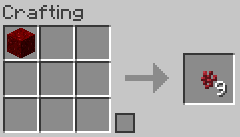
Nether Wart Block Reversal
Thanks for the idea, ERRonLoad. This situation happened to me too, we crafted 9x nether wart into a nether wart block and didn’t realize it can’t be reversed. So this is just a simple recipe to undo that craft: Put a nether wart block in a crafting table to get 9 nether wart back.
Also on the subject of custom recipes, there is now a dedicated page for all the custom recipes we have on the server. You can find it on the sidebar, or just go here: https://www.pwn9.com/minecraft/recipes/
I don’t really want to be doing the extra work of writing about custom recipes twice, so from now on, in future posts, I’ll just mention the name of a new custom recipe I added and then you can find the full recipe and screenshot on that specific recipes page.
Quality of life changes & New features
- Global Shop
- You can use the “/sell hand” and “/sell all” commands for quickly selling stuff from your inventory to the shop.
- WARNING, “/sell all” will instantly sell every possible sell-able item from your inventory and hot-bar without confirmation or warning. No refunds if you accidentally sold a valuable item and want to get it back; you have to buy it back yourself at the higher buy price. Maybe its better to just pretend it doesn’t exist.
- Quick tip: “/sell hand”, (or just selling in general), works in all worlds. Useful if you need the extra inventory space, just sell your items!
- Random Fun fact: You can sell bows and fishing rods to the shop, which is useful if you have one with a curse on it and want to make a couple extra bucks.
- You can use the “/sell hand” and “/sell all” commands for quickly selling stuff from your inventory to the shop.
- Chestshops
- To get started with a chest shop, just aim at a chest and type “/scs create <name>“. Then when you open the chest, you are presented with a menu to configure everything else such as item, price, etc.
- ERRonLoad already has a sample shop set up near spawn, selling fire potions for $200 each at 387x, -239z (East of Spawn) if you want to go test it out. (Might be sold out by the time I make this post)
- Speaking of player shops, Waldkwen’s town of Ashdeep has shop spaces for everyone in a new market. Visit with “/town Ashdeep spawn“.
- Player-Heads
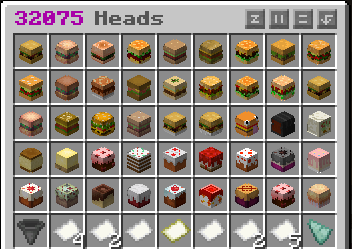
- There is now a “/heads” feature to buy decorative player heads.
- 1 head costs 1 emerald.
- Since there are 32k heads, take advantage of the conveniently placed filter button on the bottom left corner (hopper icon). It will open up an anvil GUI where you type in a search word (make sure to remove the question mark already typed there), and then pick up the paper in the output slot to show the results.
- There is now a “/heads” feature to buy decorative player heads.
- Sit anywhere
- Added a plugin to let people sit on blocks.
- Right-click on stair, slab, or carpet to sit on it!
- Or sit ANYWHERE with the /sit command.
- Other commands:
- /lay to lay down on your back anywhere. Cant move.
- /bellyflop to flop onto your belly anywhere. Cant move.
- /crawl, like bellyflop but you can move around.
- /spin does a nonstop spin animation until you stop it. Cant move.
- /sit toggle, to enable/disable sitting on blocks with right-click.
- /sit playertoggle, to enable/disable sitting on other players.
- To cancel any of these actions, crouch to go back to normal.
- Added a plugin to let people sit on blocks.
- Death Coordinates
- Now when you die, you’ll get a message telling you the coordinates of where you died. I still don’t want to implement any kind of gravestone/death-chest feature, so all your items will still expire after 5 minutes if you don’t hurry back to those coords and get them!
- Books and Bookshelves (3 features here, don’t skip)
- 3 new features for the book hoarders and librarians among us:
- Regular bookshelves now have their own internal storage with 2 rows of space.
- You can now instantly see the titles of books on a Chiseled bookshelf by aiming at it.
- You are now able to split off single enchantments at a time from an enchantment book with multiple enchantments:
- Place the enchanted book and a regular book in an anvil.
- It’ll pick an enchant at random but you can just keep rolling it until you get the one you want.
- It costs a couple of levels depending on the enchantment’s level.
- Doesn’t work with cursed books, that would be too cheesy.
- Place the enchanted book and a regular book in an anvil.
- 3 new features for the book hoarders and librarians among us:
- Post Office
- I spent a lot of time making a new post office building in the spawn area. It features a sign shop that sells writable books for $5 each, and a fully working P.O. Box system where everyone can deposit/donate items to other players’ mailboxes but only the owner can take out the items.
- To claim a box, simply aim at an “Unclaimed” box and type “/po claim“.
- I also tried to make a “Community Notice Board” outside of the building but I am unsure if other players are able to write their custom messages to it yet or not. Will test later.
- I spent a lot of time making a new post office building in the spawn area. It features a sign shop that sells writable books for $5 each, and a fully working P.O. Box system where everyone can deposit/donate items to other players’ mailboxes but only the owner can take out the items.
- Armor Stand Editor
- Added an Armor Stand editor plugin that lets you fully manipulate an armor stand to your heart’s desire. Every possible setting is included, such as enabling arms, stand size, invisibility, invulnerability, and of course the rotation and positioning of every body part on the armor stand or the entire stand itself.
- It’s actually quite a bit of work, but once you get the hang of it, its really nice. The design possibilities are endless! To get started, hold a flint in your hand and right-click anywhere besides on the armor stand to open up the menu. Choose a couple of the settings, and then left/right click on the armor stand to apply those settings to it. It is repeatable, so you can just keep clicking on it nonstop to keep rotating it or whatever.
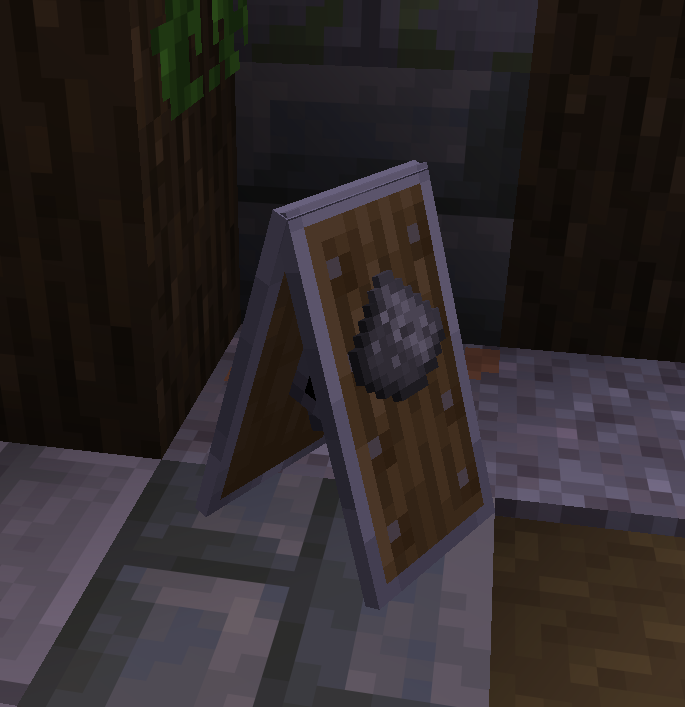
- The sandwich board in this picture was made with 4 armor stands: 2 holding shields and 2 wearing gunpowder on their heads.
- Added an Armor Stand editor plugin that lets you fully manipulate an armor stand to your heart’s desire. Every possible setting is included, such as enabling arms, stand size, invisibility, invulnerability, and of course the rotation and positioning of every body part on the armor stand or the entire stand itself.
- Trading
- There is now a plugin to do direct player-to-player trading via a GUI. Use “/trade” to use it. Not that we really needed it since everyone has been sharing everything by throwing it at their feet, but maybe in the future if we get more players with questionable trustworthiness, this is a more secure way to do trades.
- Another random fun fact: When sleeping in a bed and it reaches enough players to skip the night, you don’t actually have to stay in the bed for the full duration, the skipping process is already happening, you can leave the bed and continue what you were doing while the sky transition animation is still happening.
Bugs & Notes
- Global Shop
- Increased the shop decay time from 30 minutes to 6 hours. People are starting to reach $1 million without having much to spend it all on yet, so hopefully this slows things down until more features are added to buy. Suggestions welcome.
- I also have plans to slowly remove items from the shop in the future to encourage player-to-player trading or selling in physical shops rather than to the global shop. First to go would probably be all the ingots except the raw versions.
I want to take this opportunity to give a huge shout-out to Sage for fixing the server’s issues that were happening a couple weeks ago, (the random server crashes), and putting up a new Japanese proxy server so Akira_Otomo can have a slightly better connection to us. And another big shout-out to all of you, the players, for coming back to play with us. None of this would exist if there wasn’t anyone to build it for. Just simply seeing someone playing makes me want to continue working on the server and making it as fun as possible.
P.S. There’s another big feature I added, but I am not going to spoil the surprise. It’ll be found, eventually.